




Your website is more than just a digital presence—it’s a conversion engine. Yet, many businesses unknowingly sabotage their own results due to poor design choices. UI UX design mistakes for conversions can silently drive visitors away, reducing leads, sales, and overall ROI.
In this guide, we’ll explore the most common design pitfalls, provide actionable fixes, and show you how to turn your website into a high-converting, user-friendly platform. Whether you’re a small business in Lahore or an international brand, understanding these mistakes can save time, money, and credibility.
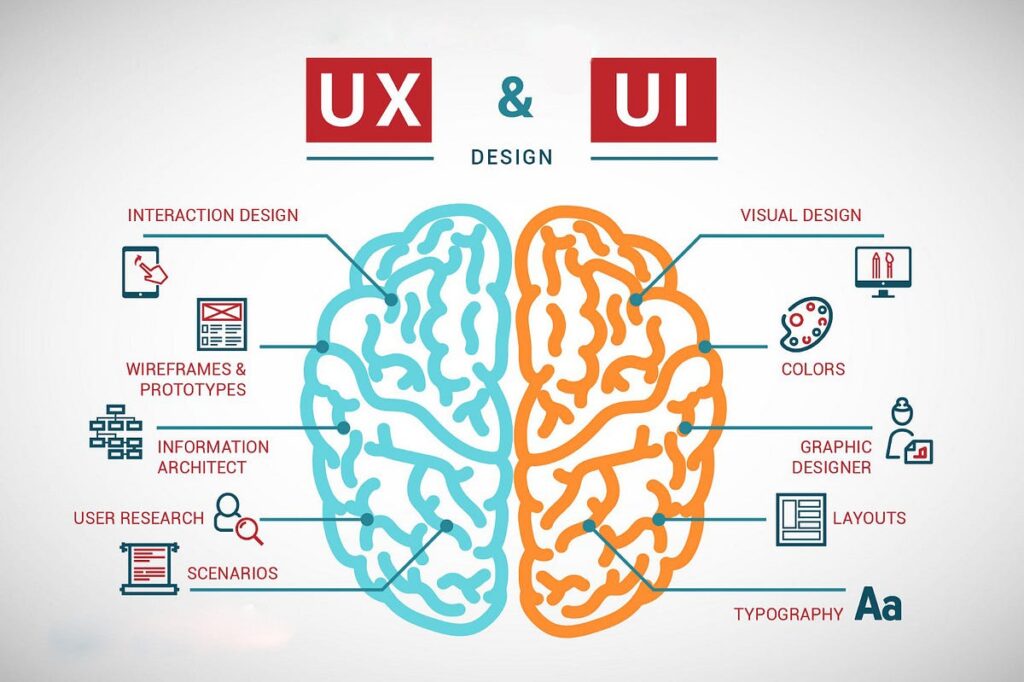
UI (User Interface) focuses on visual design, layout, and interactions, while UX (User Experience) ensures smooth usability and user satisfaction. When these two elements fail, conversions drop—even if traffic is high.
Some common UI UX design mistakes for conversions include:
Understanding these issues is the first step toward boosting conversion rates.
A busy website can overwhelm visitors, causing them to leave before completing a purchase or form. Research shows that users decide within 3 seconds whether to stay on a page.
Fix:
Example: A landing page with a single, prominent CTA increased conversions by 35% after removing distracting elements.
According to Google, 53% of mobile users leave pages that take longer than 3 seconds to load. A slow website directly impacts UX and SEO rankings.
Fix:
Internal Link Suggestion: Check our blog on Website Performance Optimization Tips for more techniques.
With over 60% of global traffic coming from mobile devices, a non-responsive website can drastically reduce conversions.
Fix:
Visitors want to find information quickly. Complex menus or hidden links increase bounce rates.
Fix:
Example: Simplifying an e-commerce menu increased product clicks by 22% in one month.
If users can’t find your CTA, conversions drop. Weak wording or multiple CTAs can also confuse them.
Fix:
Without credibility elements, users hesitate to buy or submit forms.
Fix:
Design decisions without testing can backfire. Analytics and user feedback are crucial for identifying friction points.
Fix:
Addressing UI UX design mistakes for conversions requires a systematic approach:
Internal Link Suggestion: Learn more in our blog on Landing Page UX Best Practices.

Poor UI UX design mistakes for conversions can silently harm your website’s performance, leading to lost revenue and credibility. By focusing on user-friendly layouts, mobile responsiveness, clear CTAs, and trust-building elements, businesses can significantly improve engagement and ROI.
CTA: Ready to fix your website’s UX and boost conversions? Contact The Brands Bureau today for a free consultation.
1. What are the most common UI UX design mistakes for conversions?
Cluttered layouts, slow load times, poor mobile design, confusing navigation, weak CTAs, lack of trust signals, and ignoring user feedback.
2. How can I improve my website’s UX to increase conversions?
Audit your site, optimize for mobile, improve page speed, simplify navigation, and implement clear CTAs.
3. Does website design really impact SEO?
Yes. Google rewards fast, mobile-friendly, and user-friendly websites, which directly affects search rankings.
4. How do I test which UX changes improve conversions?
Use A/B testing, heatmaps, user surveys, and analytics to measure user engagement and conversion rates.
5. Can small businesses in Lahore improve conversions without redesigning the entire website?
Absolutely. Small, targeted changes in CTAs, mobile responsiveness, and layout can boost conversions without a full redesign.
Umair Ijaz is a UI/UX and digital marketing expert at The Brands Bureau, Lahore. With over 8 years of experience, He helps businesses optimize websites, improve conversions, and build trustworthy digital experiences.






Blog Comment (01)
[…] like facial recognition and fingerprint scanning, will be seamlessly integrated into mobile app designs for enhanced […]